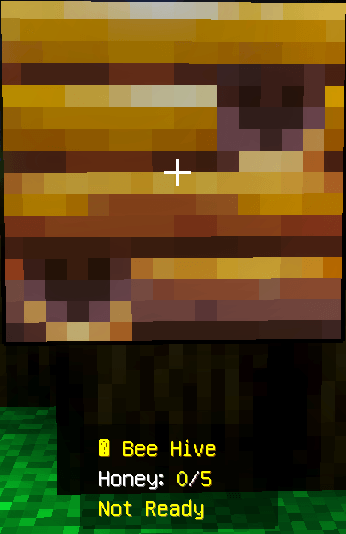
View the current honey level of any Beehive or Bee Nest simply by looking at it. Hive Info shows progress from 0/5 to 5/5 and lets you know when the hive is ready to harvest.
# Hive Info – Beehive Honey Level Display
Take the guesswork out of harvesting honey with **Hive Info** for Minecraft Bedrock Edition.
Whenever you aim at a Beehive or Bee Nest, the addon displays its current honey level directly on your screen. You can instantly see how much honey has accumulated and whether the hive is ready to be harvested.
Hive Info is especially helpful when managing large bee farms, where checking every hive using honey particles alone can be difficult.
## What Hive Info Shows
The display identifies the block you are viewing and reports its honey level from `0/5` to `5/5`.
A hive that is still filling may display:
```text
🐝 Beehive
Honey: 3/5
Not Ready
```
Once the hive reaches its maximum honey level, the display changes to:
```text
🐝 Beehive
Honey: 5/5
Ready!
```
## Main Features
* View the current honey level by looking at a hive
* Supports both Beehives and naturally generated Bee Nests
* Tracks honey levels from `0/5` to `5/5`
* Clearly indicates when honey is ready to collect
* Useful for small gardens and large automated bee farms
* Works in Survival gameplay
* Compatible with new and existing worlds
* Supports single-player and multiplayer
* Does not require cheats
* Does not use experimental Beta APIs
* Lightweight design with no complicated setup
## Using the Addon
1. Add Hive Info to your Minecraft world.
2. Enter the world and locate a Beehive or Bee Nest.
3. Point your crosshair directly at the hive.
4. Read the honey information displayed on your screen.
5. Harvest the hive once the level reaches `5/5`.
Remember to use a campfire or another safe harvesting method if you want to avoid angering the bees.
## Installation Instructions
1. Download the Hive Info pack.
2. Open the downloaded file to import it into Minecraft Bedrock Edition.
3. Edit the world where you want to use the addon.
4. Open the **Behavior Packs** section and activate Hive Info.
5. Leave Experimental Features disabled.
6. Start the world and look at a Beehive or Bee Nest to test the display.
## Supported Gameplay
Hive Info can be used in:
* Minecraft Bedrock Edition
* Survival worlds
* New or previously created worlds
* Single-player sessions
* Multiplayer worlds
* Bee farms and honey-production areas
* Manual and automated farming setups
## Important Achievement Notice
Recent changes to Minecraft Bedrock may cause the game to show **“Achievements disabled”** when a custom behavior pack is activated.
Hive Info itself does not enable cheats and does not require experimental Beta APIs. However, Minecraft—not the addon—determines whether achievements remain available in a world.
Because this behavior may vary between Minecraft versions, you should currently treat Hive Info as **not achievement-compatible**. If keeping achievements available is important, make a copy of your world before activating the pack.