Save, manage, and travel to important locations in your Minecraft Bedrock world with an easy in-game waypoint system.
# Improved Waypoints
Turn locations in your Minecraft Bedrock world into destinations you can actually manage.
**Improved Waypoints** provides an in-game navigation system for saving important places, returning to locations, sharing destinations with other players, exploring with Random Teleport, and managing travel features across a multiplayer world.
Whether you're keeping track of a distant base, a newly discovered biome, a Nether portal, a mining area, a friend's build, or a community location, Improved Waypoints gives you a central menu for managing where you've been and where you want to go.
The addon is designed for both personal Survival worlds and larger multiplayer environments where players may accumulate dozens of useful locations over time.
**Current Minecraft Bedrock support: 1.26.30**
## Build Your Own Location List
Instead of writing coordinates down somewhere outside Minecraft, save the places you care about directly to your waypoint list.
A saved waypoint can represent practically anything:
- Bases and houses
- Villages
- Mines
- Farms
- Strongholds and structures
- Nether portals
- Shops
- Player builds
- Community areas
- Interesting biomes
- Future building locations
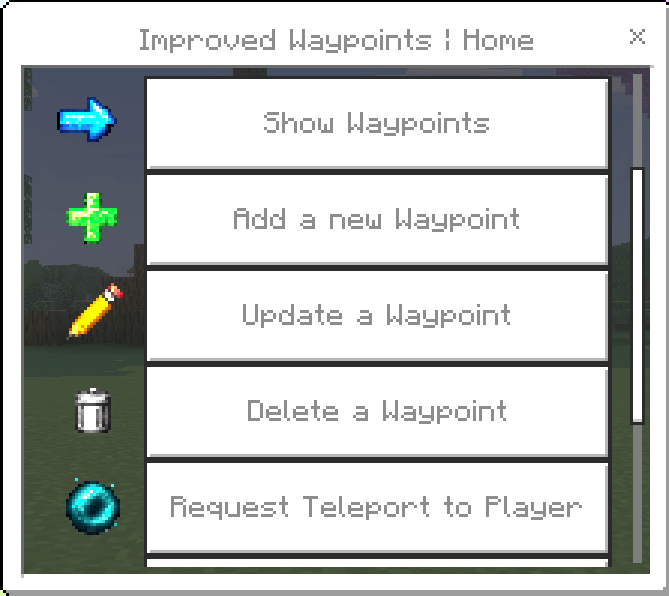
Waypoints can be viewed, updated, removed, and used for travel directly from the Improved Waypoints menu.
## Keep Locations Private or Share Them
Not every destination needs to be visible to the entire world.
**Private Waypoints** remain part of your personal waypoint collection. They're useful for your own bases, projects, resource locations, or anything else you don't need to share.
**Public Waypoints** create shared destinations that other players can access. They work especially well for server spawn areas, public farms, shopping districts, community portals, towns, events, and other locations everyone may need.
World administrators can also moderate the public waypoint list and remove an entry from public access without deleting the original waypoint from its owner's private collection.
## Automatic and Manual Safe Areas
Improved Waypoints provides two separate Safe Area systems.
### Automatic Safe Area
As you travel, the addon periodically records a recent safe position.
This location updates as you continue exploring, giving you a recent point you can return to using **Teleport to Automatic Safe Area**.
### My Safe Area
Need a location that stays exactly where you put it?
Create a personal Safe Area and it remains saved until you choose to update it. Before an existing Safe Area is replaced, the addon asks for confirmation to help prevent accidental changes.
Select **Teleport to My Safe Area** whenever you want to return.
The Automatic and Manual Safe Areas operate separately, so updating one does not replace the other.
## Explore with Random Teleport
Random Teleport provides a quick way to leave familiar territory and discover somewhere new.
RTP is available for:
- **Overworld**
- **Nether**
- **The End**
Improved Waypoints doesn't simply throw the player at random coordinates. The addon checks the destination for a usable landing position before completing the teleport.
The safety search looks for solid ground and enough space for the player while rejecting dangerous or unsuitable landing locations such as lava, fire, magma blocks, cactus, powder snow, the Nether roof, and the End's void.
After arriving, temporary **Slow Falling** protection provides additional protection while the destination loads. Once the player remains safely on the ground for 5 seconds, the effect is removed.
## Return After a Death
Dying far away from home doesn't have to mean trying to remember exactly where you were.
Improved Waypoints can save your previous death location and provide a **Teleport Back to Death** option after you respawn.
Once that location is no longer useful, **Clear Death Location** removes the stored death-return information without affecting your waypoints or Safe Areas.
## Player-to-Player Teleport Requests
Multiplayer worlds can use teleport requests instead of allowing players to teleport to someone without permission.
Send a request to another player and let them decide whether to accept or deny it.
This makes player teleportation useful for friends and communities while leaving the receiving player in control.
## More Waypoints as Your World Grows
A new world might only need a few saved locations. A world that's been running for months can need considerably more.
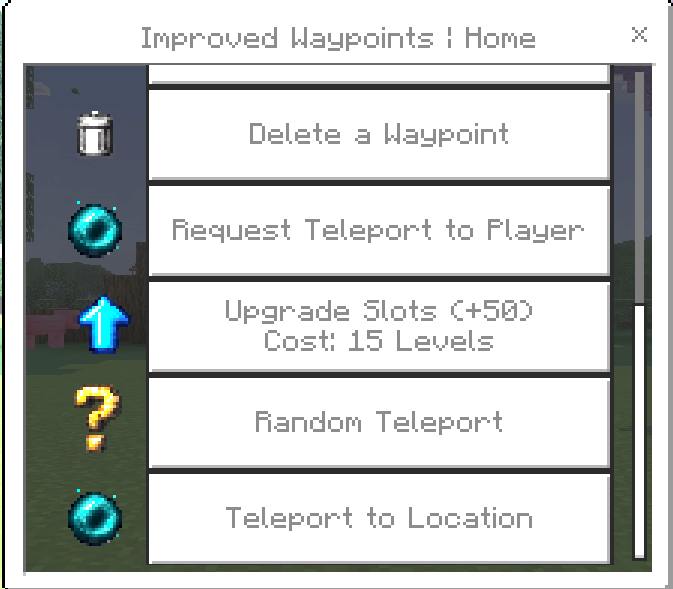
Improved Waypoints includes an upgrade system that allows players to spend XP levels to increase their waypoint capacity.
The world administrator can configure:
- How many slots each upgrade provides
- The XP level cost
- The maximum number of waypoint slots
This allows server owners to balance waypoint progression around their own Survival world or community.
## Waypoint Administration
Improved Waypoints includes its own administration menu for controlling features at the world level.
The first player to join after the administration system is installed becomes the initial **Waypoint Admin**. Additional administrators can be assigned using the `waypoint:admin` tag.
Regular players do not see the administration menu.
Admins can control whether players have access to:
- Teleport to Location
- Request Teleport to Player
- Random Teleport
Random Teleport permissions can be configured individually for the Overworld, Nether, and End.
Admins can also configure the waypoint upgrade system and manage publicly shared waypoints.
Administrator settings are saved with the world and remain in place after restarts.
## Lost Your Waypoint Menu?
The Waypoint Menu compass provides access to the addon's features and is normally given to the player automatically.
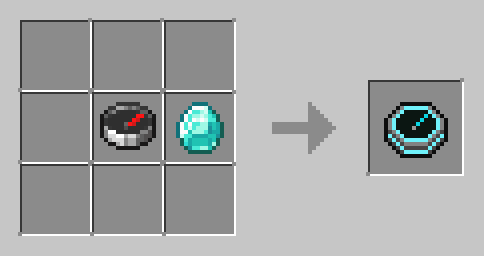
If your compass is ever lost or destroyed, you don't have to reinstall the addon or reset anything. Simply craft another **Waypoint Menu**.
### Crafting Recipe
You need:
- **1 Compass**
- **1 Diamond**
Place the Compass and Diamond beside each other in a crafting grid to create another Waypoint Menu.
Your existing waypoints, upgrades, Safe Areas, and other saved information are not stored in the compass, so crafting a replacement does not reset your progress.
## Designed for Persistent Worlds
Improved Waypoints is built with long-running worlds in mind.
Player waypoints, public destinations, Safe Areas, upgrades, and administrator configuration use persistent world data so important information remains available across normal world and server restarts.
The addon can be used in:
- Single-player Survival worlds
- Multiplayer worlds
- Minecraft Realms
- Dedicated Bedrock servers
Both the **Behavior Pack** and **Resource Pack** should be enabled.
## Achievements
Improved Waypoints is designed around the stable Minecraft Bedrock API and does not require experimental Beta APIs or cheats for its normal operation.
Under currently tested Minecraft Bedrock behavior, achievements can remain available while using the addon.
**Important:** Achievement eligibility is ultimately controlled by Minecraft. Mojang may change addon, scripting, or achievement behavior in future Bedrock releases. Always make a backup before installing or updating an addon in an important world.
## Resource Pack Support
The Improved Waypoints Resource Pack includes **PBR capability**, providing compatibility with Minecraft Bedrock's modern PBR rendering support.
## Improved Waypoints Features
- Personal waypoint collections
- Shared public waypoints
- Public waypoint moderation
- Automatic Safe Area
- Player-defined Safe Area
- Death-location return
- Coordinate-based teleportation
- Player teleport requests
- Overworld Random Teleport
- Nether Random Teleport
- End Random Teleport
- Safe RTP landing search
- Temporary Slow Falling after RTP
- Expandable waypoint capacity
- XP-based slot upgrades
- Configurable upgrade limits and costs
- World-level Waypoint Admin menu
- Configurable teleport features
- Persistent administrator settings
- Craftable replacement Waypoint Menu
- Multiplayer support
- PBR-capable Resource Pack
- Stable API design
## Credits
**Improved Waypoints** is developed and maintained by **MaskedNinja**.
The original **Basic Waypoints** addon was created by **
Rezn1r**.
Improved Waypoints builds on that original idea with an expanded system for location management, Safe Areas, exploration, multiplayer travel, waypoint progression, and world administration.